> ## Documentation Index
> Fetch the complete documentation index at: https://docs.trykura.com/llms.txt
> Use this file to discover all available pages before exploring further.
# For Loops
> Implement iterations in your workflow using For Loop blocks
For Loop blocks enable you to process multiple workflow blocks repeatedly for each item in a list.
## How It Works
A For Loop block allows you to repeat workflow actions over a given list. It requires two components:
1. **Value**: A list of items you want to process
2. **Name**: A variable name to reference each item during the loop execution
## Working with Loop Items
During iteration, you can reference the current item using:
* `{name.value}` - represents the current item's value
* `{name.key}` - represents the index position in the list (0, 1, 2, etc.)
When using the AI Assistant to add workflow blocks inside a For Loop, the
assistant will always perform the action with the context of the first item in
the list.
## Example Use Case
Let's say you want to extract contact information from multiple LinkedIn profiles:
* **Value**: `[linkedin.com/profile1, linkedin.com/profile2, linkedin.com/profile3]`
* **Name**: `linkedin_url`
The workflow blocks inside the For Loop will execute for each URL, with `linkedin_url` representing the current profile being processed.
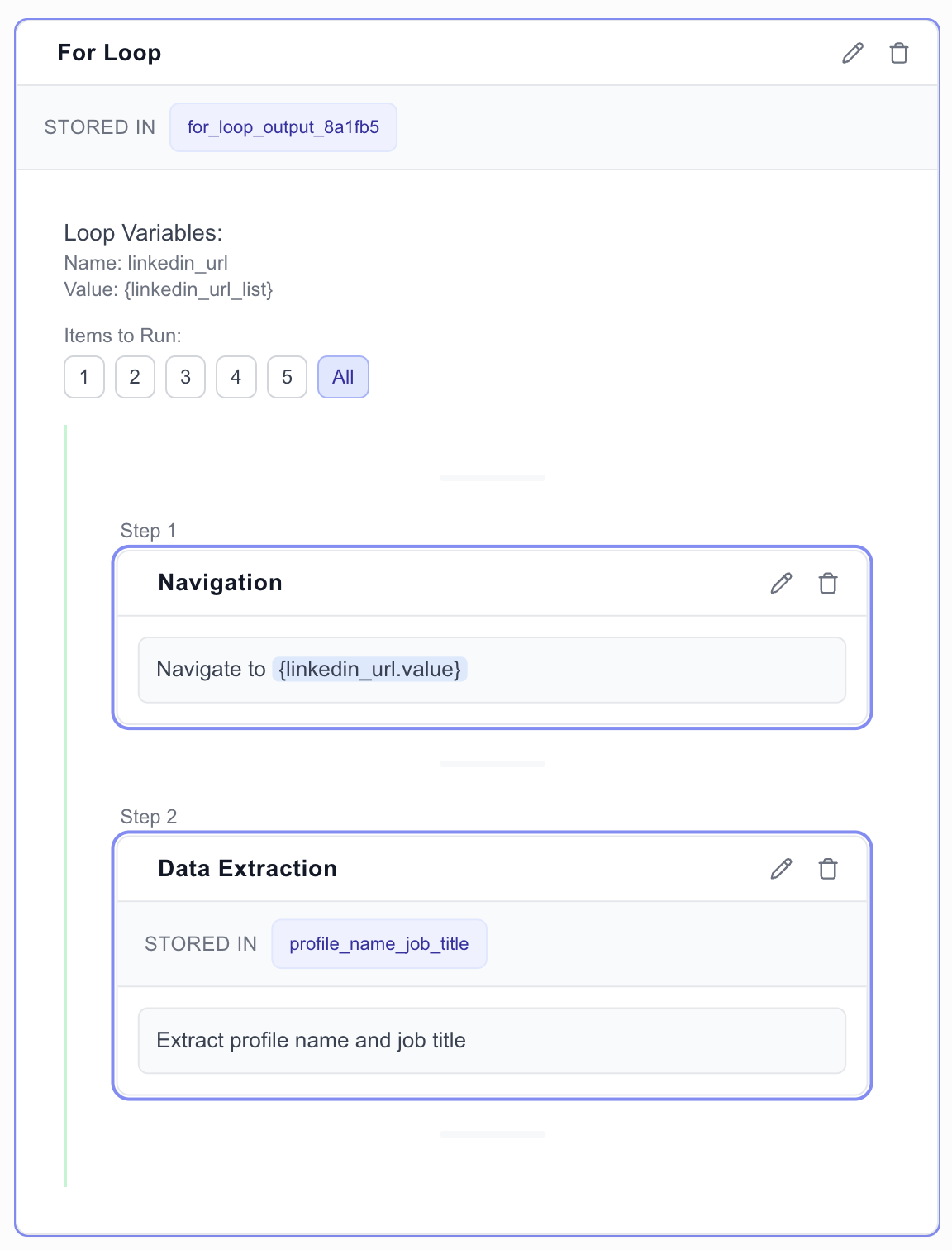 The Value field must always be a list of items.